Engine choice
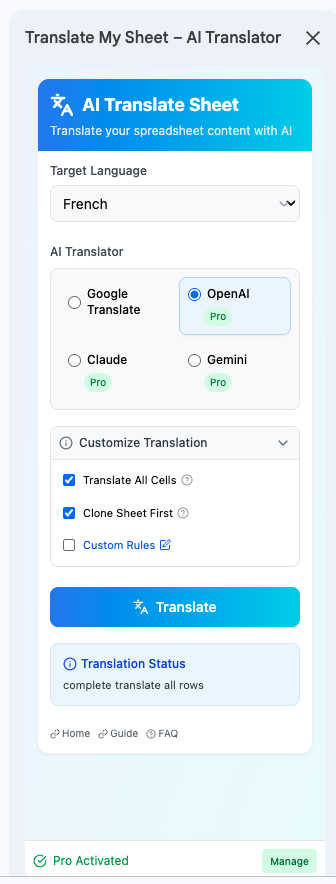
Compare Google Translate, OpenAI, Claude, and Gemini in one workflow.
Use the same selected cells to test a fast machine-translation engine or one of three context-aware AI providers.
Why it matters
There is no single best engine for every spreadsheet. The useful choice depends on text length, context, instructions, speed, and review requirements.
Google Translate
A practical free starting point for straightforward text and common language pairs.
OpenAI and Claude
Useful when natural phrasing, longer context, or close instruction following matters.
Gemini
Another multilingual AI option available from the same sidebar and custom-rules workflow.
How it works
Three steps in the sidebar.
- 01
Create a sample range
Choose rows that represent the real vocabulary and sentence lengths in your sheet.
- 02
Run the same sample
Translate the range with the engines you want to compare.
- 03
Choose by evidence
Review accuracy, tone, terminology, and editing time before processing the full sheet.
Good practice
AI output is probabilistic. Review business-critical translations and use a qualified translator for regulated or high-stakes content.
Translate the sheet in front of you.
Install the add-on from Google Workspace Marketplace and start with Google Translate for free.